A software quote can look affordable until you add the features your board actually needs, the setup work and the payment fees. To compare Condo association and HOA software costs, ask each provider to price the same jobs for the same community. Calculate year one and renewal separately, identify what homeowners pay, and write down the work volunteers will still do.
Start with the problems you want to solve. Otherwise, you can sit through a great sales presentation and buy an answer to a problem your board doesn't have.
Key takeaways
- Compare the full package your board needs, not the lowest advertised plan.
- Separate recurring charges, one-time setup costs and usage-based fees. Mark unanswered prices as unknown, not zero.
- Keep homeowner-paid charges visible even when they don't come out of the association's bank account.
- Make vendors demonstrate your actual tasks, then identify the decisions and work that remain with the board.
- Check onboarding, support, data use and exit terms before signing. A low price doesn't answer those questions.
Start with what your board is struggling with
Before booking demos, ask each board member: What keeps taking more time than it should?
Maybe the treasurer can't match an invoice to the approved quote. Maybe nobody can find the latest answer to an architectural request. Maybe homeowners keep asking whether their dues payment was received.
Write down your three biggest problems. For each one, record what happens now, who handles it and what a better process would look like. If you want to measure time saved later, record a few real examples of the current workload. Don't invent an hourly savings figure to justify a purchase.
Take that list to every provider. Ask them to show those tasks in the plan you're considering. A feature list doesn't tell you whether a volunteer can finish the work without opening three other tools.
If you're still deciding which capabilities belong on your shortlist, our guide to software for self-managed HOA boards covers the broader selection. This article is about comparing the quotes once you know what you need.
Ask for a quote that matches your community
Give each vendor the same assumptions: number of homes, board users, payment frequency, expected payment methods, records to import and required features. Ask for a dated quote identifying the plan and any optional services.
Then work through five groups of costs.
The subscription and the features you need
Is the price per community, per home or subject to a minimum? Does it assume annual payment? What changes if more homes are added?
Ask specifically about AI tools, document storage, messaging, accounting, architectural requests and any other feature on your list. Find out whether each is included, limited or priced separately. Don't assume every provider charges for these extras, either. The answer should be in the quote.
This guide is published by Solume. The public vendor pages below were checked on November 6, 2026.
For example, PayHOA's published pricing page separates its subscription from transaction charges, mailed communications and optional services. It also lists unlimited storage. Buildium's pricing page distinguishes plan levels, support access and additional fees, and directs community associations to contact sales for pricing. These examples show why the details matter; they aren't a ranking or a substitute for a quote for your association.
Setup and the work required to switch
Ask who imports the homeowner list, opening balances and documents. Does the service include checking that the imported information is correct? Who fixes missing or inconsistent records?
Get the onboarding scope, expected timing, responsibilities and charges in writing. A vendor can import a file without resolving years of incomplete records. If your board needs bookkeeping help or data cleanup, price that work rather than assuming it comes with the software.
Payments and other usage charges
Identify the charge for each payment method and who pays it. Ask about returned payments, disputes, mailed notices, check services and any account setup charges that apply.
Estimate usage using your own collection schedule and payment mix. For a fixed fee, multiply the expected number of transactions by the fee. For a percentage fee, use the expected dollar amount processed, plus any fixed charge. Keep association-paid and homeowner-paid amounts separate so you don't count the same fee twice.
Whether a charge may be passed to homeowners is a separate question. Check the applicable payment terms, governing documents and law before deciding how to allocate it.
Support and outside help
What happens when the treasurer has a question after the sales process is over? Is support by email, chat, phone or appointment? What hours is it available, and is the help you need included in your plan?
Ask what support covers. Learning how to use a budget screen, having someone do the bookkeeping and getting professional accounting advice are different services. So are product guidance and legal advice about an enforcement decision.
Renewal and leaving
Ask what changes after introductory offers end, whether renewal pricing is fixed or subject to change, and how much notice is needed to cancel. Check whether the price shown per month is actually an annual commitment.
Also ask how to export records, what formats are available, whether attachments and history are included, and whether assistance costs extra. Have the vendor demonstrate an export with sample information. The board should understand how it would retrieve its records before it needs to leave.
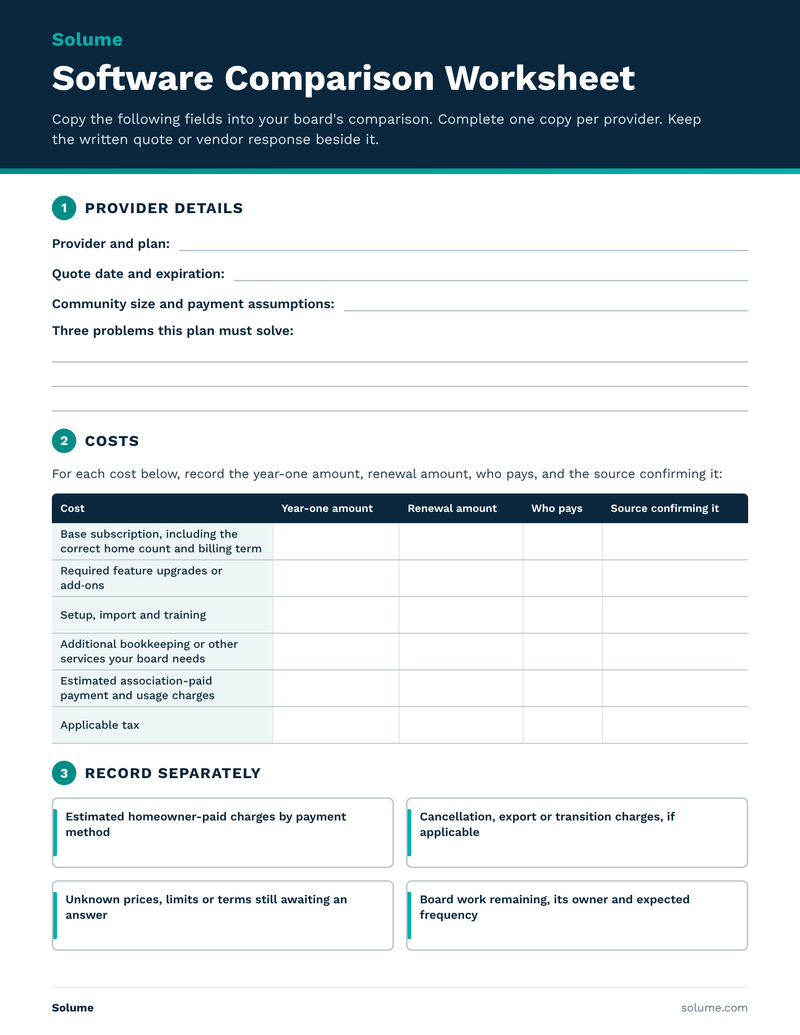
Use the same comparison worksheet for every quote
Copy the following fields into your board's comparison. Complete one copy per provider. Keep the written quote or vendor response beside it.
Provider and plan:
Quote date and expiration:
Community size and payment assumptions:
Three problems this plan must solve:
For each cost below, record the year-one amount, renewal amount, who pays, and the source confirming it:
- Base subscription, including the correct home count and billing term
- Required feature upgrades or add-ons
- Setup, import and training
- Additional bookkeeping or other services your board needs
- Estimated association-paid payment and usage charges
- Applicable tax
Record separately:
- Estimated homeowner-paid charges by payment method
- Cancellation, export or transition charges, if applicable
- Unknown prices, limits or terms still awaiting an answer
- Board work remaining, its owner and expected frequency
Add only confirmed amounts and clearly labeled estimates to the cost calculation. Keep unknowns next to the subtotal. An unanswered fee shouldn't quietly become a zero.
Year-one association cash cost is the subscription plus required extras, setup, services, estimated association-paid usage and applicable tax. Renewal removes genuinely one-time costs and uses the renewal prices and usage assumptions. Volunteer time belongs alongside these figures as a workload consideration, not a cash saving unless the association actually avoids a paid expense.
A small example of why the headline price isn't enough
This is a hypothetical comparison, not Solume or competitor pricing.
Plan A advertises a $1,200 annual subscription. The board needs a $480 feature package, $300 setup and $240 in estimated association-paid usage charges. Its known year-one subtotal is $2,220.
Plan B's subscription is $1,800 and includes the required features. With $200 setup and $120 estimated usage, its known year-one subtotal is $2,120.
Assuming those recurring prices and usage stay the same, both renew at $1,920 before applicable tax. Homeowner-paid fees, exit costs and remaining work still need comparison. The lower advertised subscription didn't produce the lower first-year subtotal, and the first-year difference didn't continue at renewal.
That is the point of the worksheet: make the comparison before the board commits.
Ask how a free or low-cost platform makes money
A free price tag deserves a straightforward question: How is this service funded?
A provider may earn revenue through paid upgrades, payment services, advertising or another business model. Ask which applies. Free software does not automatically mean community data is being sold, and a paid subscription does not establish how data will be used.
Read the privacy terms and ask what information is shared, with whom and for what purpose. Ask whether homeowners see advertising or receive third-party marketing, and whether community information is used to train AI models. Get clear answers that match the contract and policy.
This is about trust as well as cost. Your residents' information shouldn't be an afterthought in a purchasing decision. The FTC's guidance on protecting personal information recommends understanding what information you hold, limiting it to what is needed and checking how service providers protect it.
Make the vendor show the work
A useful demo follows one of your actual problems from beginning to end, using sample or appropriately redacted information.
For invoice review, ask the presenter to find the approved quote, supporting records and invoice, then show how the board records its review. For dues, follow a charge through payment and see how an unpaid balance is identified. For an architectural request, follow submission, questions and the final decision without losing the conversation.
Then ask: What would our board still have to do here?
The board still makes decisions, checks its authority, follows required processes, reviews spending and plans for future needs. Software can organize information and automate configured tasks. Buying it doesn't transfer those responsibilities to an AI model.
When a more expensive plan may be worth it
Getting help after signup is part of the purchase. Ask how support works once the sales and onboarding conversations are over.
Paying more may make sense when the plan solves a problem your board has and includes the help needed to use it. Look for a defined onboarding process, reachable support and clear answers about who does what. A smaller vendor isn't automatically more responsive; ask the same questions of every provider.
If a provider offers best-practice guidance or introductions to outside specialists, ask what's included and what those specialists charge separately. Don't treat a software subscription as a promise of management, legal or accounting services.
Bring your board's problems to a Solume demo
Solume's financial management tools include budgeting, transaction records, and vendor information. It’s reserve study tool is the best on the market for keeping your financial projections on target. Its ARC tools keep requests and related communication together. Those are useful places to start if your board is losing time hunting through records and message threads.
Bring your three biggest frustrations and your comparison worksheet to a Solume demo. Ask us to demonstrate the relevant workflow and explain the full quote, onboarding scope and work your board will still own.
Frequently asked questions
How much does HOA software cost?
The useful number is the cost of a plan configured for your community. Home count, included features, billing term, services and usage can change the amount. Request a complete written quote and calculate year one and renewal rather than treating a starting price as the final cost.
What fees should an HOA board check beyond the subscription?
Check required upgrades, setup, import, training, outside services, payment processing, returned payments, mailed communications, applicable tax and exit assistance. A category may be included or not applicable. Confirm it instead of assuming it costs extra.
Is free HOA software a bad choice?
For data security, free HOA software is a major liability. Find out how it is funded, what is included, how community data is used, and how you retrieve your records. Then test whether it solves your board's problems. Price alone doesn't establish fit or privacy practices.
Should homeowner-paid processing fees count in the comparison?
Yes, but show them separately from association expenses. They still affect residents' experience and payment choices. Use the same payment assumptions across quotes, and verify any proposed fee allocation before implementing it.
Can software replace the decisions a self-managed board makes?
No. It can help track records and carry out configured tasks, but the board still reviews spending, follows its governing requirements and makes the decisions assigned to it. Ask the vendor to identify the remaining work during the demo.
When is paying more for HOA software reasonable?
When the additional price buys capabilities your board needs or clearly defined help it would otherwise lack. Confirm onboarding, support and any outside services in writing. Test the workflow before assuming the higher-priced plan will save time.